Step 1. [ Open Start Menu ]
|

|
Step 2. [ Open Control Panel ]
|
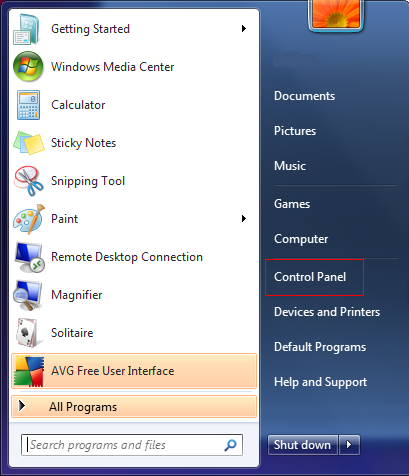
|
Step 3. [ Open Network and Internet Settings ]
|
- |
click the 'Network and Internet' link |
|
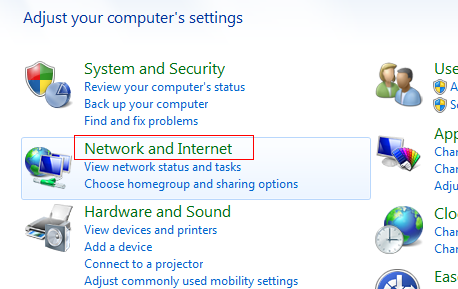
|
Step 4. [ Open Network and Sharing Center ]
|
- |
click the 'Network and Sharing Center' link |
|
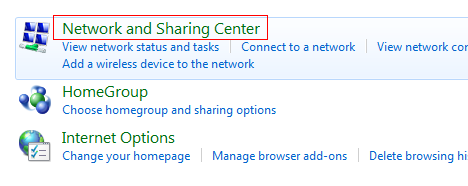
|
Step 5. [ Choose Network Settings ]
|
- |
click 'Set up a new connection or network' from list |
|
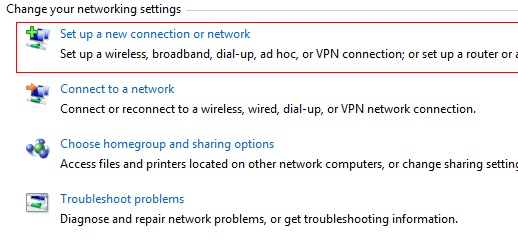
|
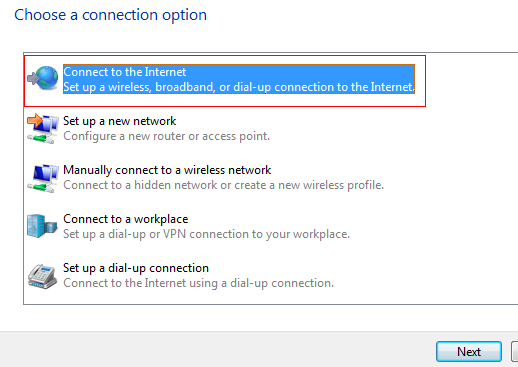
Step 6. [Choose Connection Option]
|
- |
click 'Connect to the Internet' |
|
- |
click 'Next' button |
|
|
Step 7. [ Choose Connection Type ]
|
- |
click 'Broadband (PPPoE)' |
|
B.png)
|
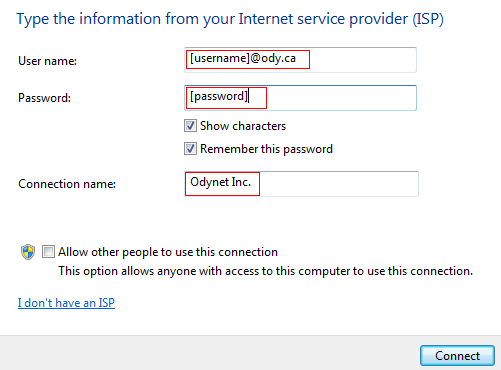
Step 8. [ Enter User Information ]
|
- |
Type in the username and password provided in the appropriate fields. |
|
- |
Type 'Odynet Inc.' in the Connection name: field. |
|
- |
click 'Connect' button. |
|
|